When I first started helping small businesses generate leads online, I realized something surprising—most of them were ignoring one of the most powerful free tools available: Google Business Profile. If you want to optimize Google Business Profile for maximum leads, you need more than just filling basic details—you need strategy, consistency, and smart SEO implementation.
In this guide, I’ll walk you through exactly how I optimize profiles to generate real leads, not just views. I’ll also share a real client story where this strategy transformed their local business.
Why You Must Optimize Google Business Profile for Maximum Leads
If you think your website alone is enough, you’re leaving money on the table.
Google Business Profile (GBP) helps you:
- Appear in local search results
- Rank in Google Map Pack
- Build trust through reviews SEO
- Improve online reputation management
But here’s the truth:
Just creating a profile is NOT optimization.
Step 1: Complete Every Section of Your Profile
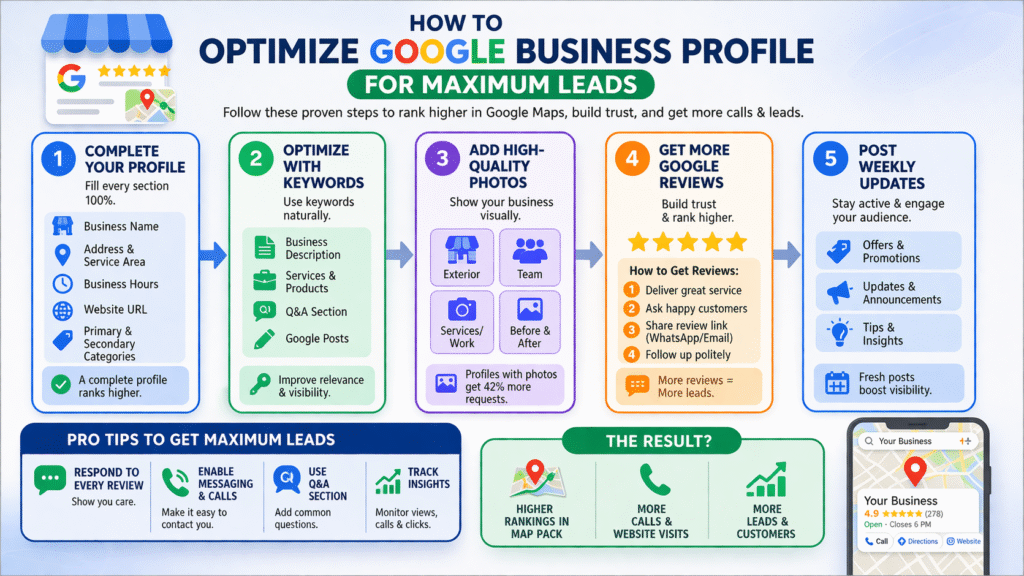
The first thing I always do when I optimize Google Business Profile for maximum leads is ensure 100% profile completion.
Key Elements to Optimize:
- Business Name (consistent with branding)
- Category (primary + secondary)
- Address & Service Area
- Business Hours
- Website URL
- Services & Products
Pro Tip:
Use keywords naturally in your business description:
- “We help local businesses get more Google reviews and improve online reputation management.”
Step 2: Keyword Optimization (Local SEO + Semantic SEO)
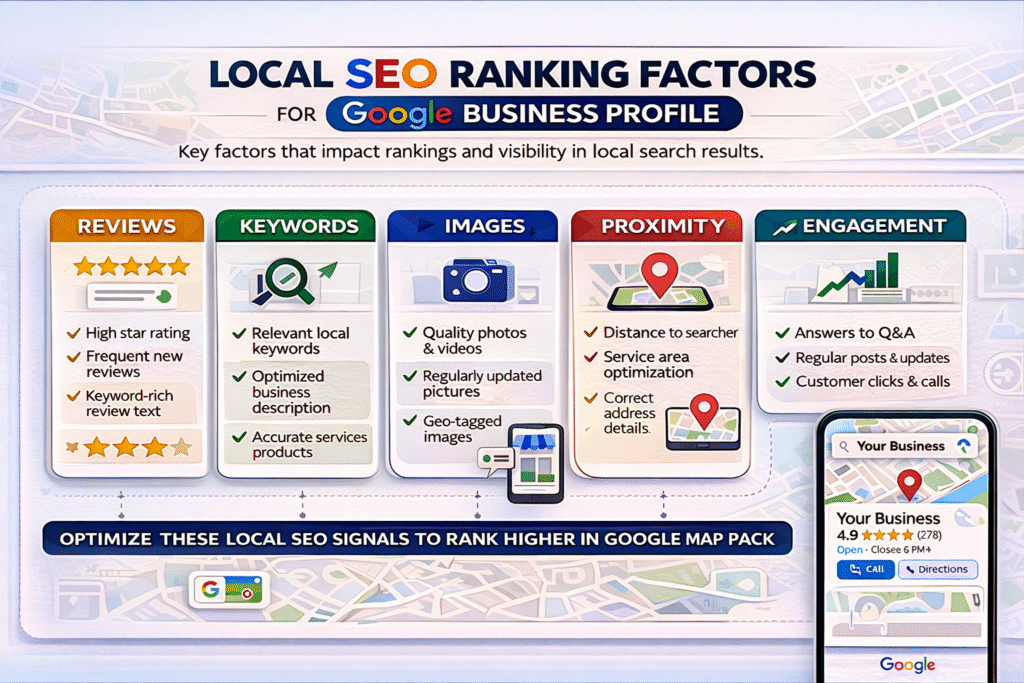
To properly optimize Google Business Profile for maximum leads, you need to include keywords strategically.
Where I Add Keywords:
- Business Description
- Services Section
- Posts
- Q&A Section
Example:
Instead of writing:
“Best digital marketing services”
Write:
“Digital marketing services focused on online reputation management and helping businesses get more Google reviews.”
This improves semantic SEO + AI search visibility
Step 3: Add High-Quality Images (Critical Ranking Factor)
Google loves active profiles.
I always recommend:
- 5–10 real business images
- Team photos
- Before/after results
- Infographics
Image SEO Tip:
Use ALT-like naming before upload:optimize-google-business-profile-for-maximum-leads.jpg
Step 4: Get More Google Reviews (Game Changer)
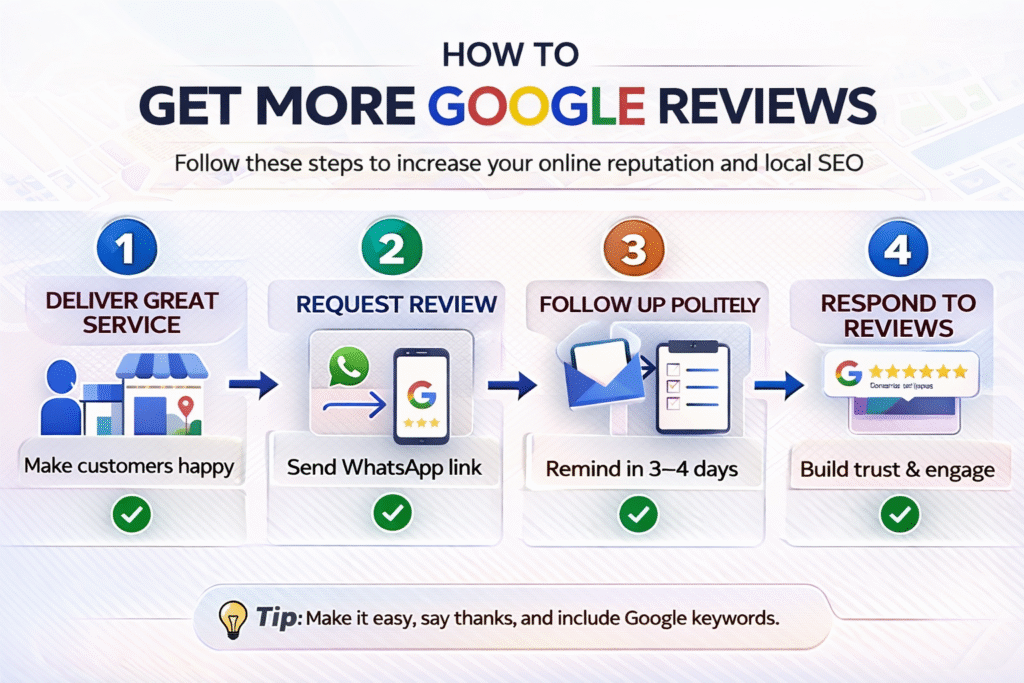
If you want to optimize Google Business Profile for maximum leads, this is the most powerful lever.
Why Reviews Matter:
- Increase trust
- Improve rankings
- Boost conversions
My Strategy to Get More Google Reviews:
- Ask immediately after service
- Send WhatsApp review link
- Offer simple instructions
Reviews SEO Tip:
Encourage customers to include keywords like:
- “Great service for online reputation management”
- “Helped me get more Google reviews”
Step 5: Respond to Every Review (Online Reputation Management)
Most businesses ignore this—and that’s a mistake.
When I optimize Google Business Profile for maximum leads, I:
- Reply to every review
- Use keywords naturally in responses
- Address negative reviews professionally
Example Reply:
“Thank you! We’re glad we could help you get more Google reviews and improve your online presence.”
This strengthens reviews SEO + trust signals
Step 6: Post Weekly Updates (Freshness Signal)
Google rewards active profiles.
Types of Posts I Use:
- Offers
- Updates
- Tips
- Case studies
Example Post:
“How we helped a local business get 50+ Google reviews in 30 days”
This builds authority + engagement
Step 7: Optimize Services & Products Section
This is an underrated section.
When I optimize Google Business Profile for maximum leads, I:
- Add detailed service descriptions
- Include keywords
- Highlight benefits
Example:
Service: Online Reputation Management
Description: Improve your brand trust and get more Google reviews with our proven strategies.
Step 8: Use Q&A Section for SEO (AEO Strategy)
This is where most people miss out.
I add FAQs like:
- How to get more Google reviews?
- Why is online reputation management important?
Then I answer them myself using keywords.
This helps rank in:
- Featured snippets
- AI overview results
Step 9: Enable Messaging & Call Tracking
Leads come from action.
Make sure:
- Messaging is ON
- Phone number is clickable
- CTA is clear
This directly impacts lead generation
Client Story: How I Generated 3X Leads
Let me share a real example.
A local fitness trainer came to me struggling with visibility.
What I Did:
- Optimized profile with keywords
- Added 20+ images
- Implemented strategy to get more Google reviews
- Focused on online reputation management
Result:
- 3X increase in leads in 45 days
- Ranked in Google Map Pack
- 60+ new reviews
This is the power when you truly optimize Google Business Profile for maximum leads.
Advanced Strategy: AI + GEO Optimization
To stay ahead in 2026 SEO:
I focus on:
- AI-readable content
- Geo-targeted keywords
- Structured answers (AEO)
Example:
“Best digital marketing services in Mumbai for getting more Google reviews”
This helps in:
- Voice search
- AI results
- Local discovery
Common Mistakes to Avoid
- Incomplete profile
- No reviews strategy
- Ignoring negative feedback
- No keyword usage
- No updates
Avoid these if you want real results FAQs
1. How long does it take to optimize Google Business Profile for maximum leads?
Usually 2–4 weeks to see noticeable results if done correctly.
2. How to get more Google reviews fast?
Ask consistently, share direct links, and follow up with customers.
3. Why is online reputation management important?
It builds trust, improves rankings, and increases conversions.
4. How often should I update my profile?
At least once a week with posts or updates.
Conclusion
If you want consistent leads without spending heavily on ads, you must optimize Google Business Profile for maximum leads.
From my experience, the combination of:
- Reviews SEO
- Online reputation management
- Regular updates
- Keyword optimization
…can completely transform a local business.
Start implementing these strategies today—and you’ll see the difference.